#

#computer

12+ Posts
  • 2026 Retrocomputing Challenge: Retro Terminal Bartop Arcade Topper

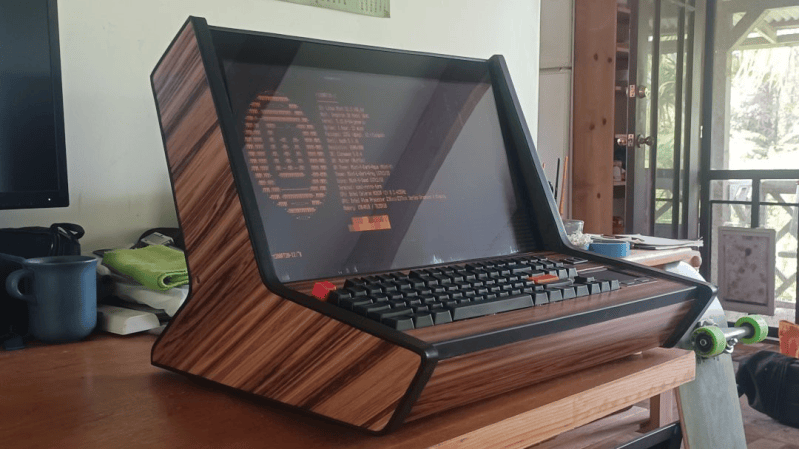
    Retrocomputing is more than just hardware. It’s also a feel, a vibe, and [valkyrie0528]’s Retro Terminal Bartop Arcade Topper has it in spades.
    The same unit, in bartop arcade machine mode.
    Here’s how it happened. The gorgeous device you see in the image above in fact started out as a bartop arcade cabinet build. The front section — with arcade buttons and joystick — is a removable panel. While building it, the panel was uninstalled and [valkyrie0528] placed a keyboard in the empty recess to do some configuration. Sitting at the machine like that felt like being right back in the 80s, perched at an 8-bit home computer. Cue a visit from the Good Ideas Fairy.
    Now, in addition to being an arcade cabinet, one can swap the arcade controls panel for a one that has a keyboard (clicky and mechanical, of course), touchpad, and small USB breakout. The result looks amazing either way. As an arcade machine it’s beautiful, and in retro terminal mode it’s simply gorgeous.
    The icing on the cake is [valkyrie0528]’s use of cool-retro-term as the terminal emulator, and there’s even a widescreen wallpaper accompanying it that puts an image of two 5.25″ floppy drives to the side. If you like that idea...
    2026 Retrocomputing Challenge: Retro Terminal Bartop Arcade Topper Retrocomputing is more than just hardware. It’s also a feel, a vibe, and [valkyrie0528]’s Retro Terminal Bartop Arcade Topper has it in spades. The same unit, in bartop arcade machine mode. Here’s how it happened. The gorgeous device you see in the image above in fact started out as a bartop arcade cabinet build. The front section — with arcade buttons and joystick — is a removable panel. While building it, the panel was uninstalled and [valkyrie0528] placed a keyboard in the empty recess to do some configuration. Sitting at the machine like that felt like being right back in the 80s, perched at an 8-bit home computer. Cue a visit from the Good Ideas Fairy. Now, in addition to being an arcade cabinet, one can swap the arcade controls panel for a one that has a keyboard (clicky and mechanical, of course), touchpad, and small USB breakout. The result looks amazing either way. As an arcade machine it’s beautiful, and in retro terminal mode it’s simply gorgeous. The icing on the cake is [valkyrie0528]’s use of cool-retro-term as the terminal emulator, and there’s even a widescreen wallpaper accompanying it that puts an image of two 5.25″ floppy drives to the side. If you like that idea...
  • SpeedTree Tutorial for Beginners: How to Create & Export Trees to Unreal Engine

    Want My Free Landscape Material? Go Here 👉 https://www.azielarts.com/aa-material
    Want To Build AAA Environments? Go Here 👉 https://www.azielarts.com/academy

    Speed Tree Pivot Painter Wind Tutorial - https://youtu.be/7tbYCGCu6gk

    Learn how to create your first tree in SpeedTree and export it directly into Unreal Engine 5 with this beginner-friendly tutorial. Whether you're building game environments or cinematic worlds, this step-by-step guide will get you up and running fast.
    #unrealengine5 #ue5 #unrealenginetutorial #environmentart

    CONNECT WITH THADDAEUS
    ◇ WEBSITE - https://tandreades.com/
    ◇ CHANNEL INSTAGRAM - https://www.instagram.com/thaddaeus_makes/
    ◇ ARTIST INSTAGRAM - https://www.instagram.com/azielartsacademy/
    ◇ ARTSTATION - https://www.artstation.com/thaddaeus

    GEAR
    ◇ CAMERA – https://amzn.to/3mAnjF7
    ◇ LENS – https://amzn.to/48f9fDE
    ◇ LIGHT - https://amzn.to/48gp5xV
    ◇ SOFTBOX - https://amzn.to/3PBNwP5
    ◇ MICROPHONE – https://amzn.to/3KY6Nrq
    ◇ AUDIO INTERFACE https://amzn.to/3Zepa14

    COMPUTER
    ◇ GPU – https://amzn.to/45OuUBc
    ◇ CPU – https://amzn.to/3om6WMG
    SpeedTree Tutorial for Beginners: How to Create & Export Trees to Unreal Engine Want My Free Landscape Material? Go Here 👉 https://www.azielarts.com/aa-material Want To Build AAA Environments? Go Here 👉 https://www.azielarts.com/academy Speed Tree Pivot Painter Wind Tutorial - https://youtu.be/7tbYCGCu6gk Learn how to create your first tree in SpeedTree and export it directly into Unreal Engine 5 with this beginner-friendly tutorial. Whether you're building game environments or cinematic worlds, this step-by-step guide will get you up and running fast. #unrealengine5 #ue5 #unrealenginetutorial #environmentart CONNECT WITH THADDAEUS ◇ WEBSITE - https://tandreades.com/ ◇ CHANNEL INSTAGRAM - https://www.instagram.com/thaddaeus_makes/ ◇ ARTIST INSTAGRAM - https://www.instagram.com/azielartsacademy/ ◇ ARTSTATION - https://www.artstation.com/thaddaeus GEAR ◇ CAMERA – https://amzn.to/3mAnjF7 ◇ LENS – https://amzn.to/48f9fDE ◇ LIGHT - https://amzn.to/48gp5xV ◇ SOFTBOX - https://amzn.to/3PBNwP5 ◇ MICROPHONE – https://amzn.to/3KY6Nrq ◇ AUDIO INTERFACE https://amzn.to/3Zepa14 COMPUTER ◇ GPU – https://amzn.to/45OuUBc ◇ CPU – https://amzn.to/3om6WMG
  • We Swapped Environments Every 15 Minutes! (Chaos Ensued)

    What happens when two Unreal Engine environment artists build a world together—but only in 15-minute bursts, with random tools, and constant scene-swapping?
    Check out @Procedural_Minds side of the challenge here👉 https://youtu.be/vOiLeCMkedc

    Want My Free Landscape Material? Go Here 👉 https://www.azielarts.com/aa-material
    Want To Build High Quality Unreal Engine Environments? Go Here 👉 https://www.azielarts.com/academy

    FOLLOW PROCEDURAL MINDS!
    YouTube Channel - @Procedural_Minds
    Twitch - https://www.twitch.tv/krozjin

    #unrealengine5 #ue5 #unrealenginetutorial #environmentart

    CONNECT WITH THADDAEUS
    ◇ WEBSITE - https://tandreades.com/
    ◇ CHANNEL INSTAGRAM - https://www.instagram.com/thaddaeus_makes/
    ◇ ARTIST INSTAGRAM - https://www.instagram.com/azielartsacademy/
    ◇ ARTSTATION - https://www.artstation.com/thaddaeus

    GEAR
    ◇ CAMERA – https://amzn.to/3mAnjF7
    ◇ LENS – https://amzn.to/48f9fDE
    ◇ LIGHT - https://amzn.to/48gp5xV
    ◇ SOFTBOX - https://amzn.to/3PBNwP5
    ◇ MICROPHONE – https://amzn.to/3KY6Nrq
    ◇ AUDIO INTERFACE https://amzn.to/3Zepa14

    COMPUTER
    ◇ GPU – https://amzn.to/45OuUBc
    ◇ CPU – https://amzn.to/3om6WMG
    We Swapped Environments Every 15 Minutes! (Chaos Ensued) What happens when two Unreal Engine environment artists build a world together—but only in 15-minute bursts, with random tools, and constant scene-swapping? Check out @Procedural_Minds side of the challenge here👉 https://youtu.be/vOiLeCMkedc Want My Free Landscape Material? Go Here 👉 https://www.azielarts.com/aa-material Want To Build High Quality Unreal Engine Environments? Go Here 👉 https://www.azielarts.com/academy FOLLOW PROCEDURAL MINDS! YouTube Channel - @Procedural_Minds Twitch - https://www.twitch.tv/krozjin #unrealengine5 #ue5 #unrealenginetutorial #environmentart CONNECT WITH THADDAEUS ◇ WEBSITE - https://tandreades.com/ ◇ CHANNEL INSTAGRAM - https://www.instagram.com/thaddaeus_makes/ ◇ ARTIST INSTAGRAM - https://www.instagram.com/azielartsacademy/ ◇ ARTSTATION - https://www.artstation.com/thaddaeus GEAR ◇ CAMERA – https://amzn.to/3mAnjF7 ◇ LENS – https://amzn.to/48f9fDE ◇ LIGHT - https://amzn.to/48gp5xV ◇ SOFTBOX - https://amzn.to/3PBNwP5 ◇ MICROPHONE – https://amzn.to/3KY6Nrq ◇ AUDIO INTERFACE https://amzn.to/3Zepa14 COMPUTER ◇ GPU – https://amzn.to/45OuUBc ◇ CPU – https://amzn.to/3om6WMG
  • lily's world XD | Launch Trailer

    Lily was an ordinary teenager in 2004, and you just found her laptop. Read her diary, message her friends, and piece together what happened to her before it’s too late. But you're not the only one with access to her computer… A fourth wall-breaking psychological horror experience featuring LilyPichu

    Developed by: SonderingEmily
    Published by: Kwalee

    🔗 Check out the game: https://on.unity.com/PlayLilysWorldXD
    🔗 Learn more and submit your project: https://on.unity.com/MWU
    🔗 Discover more Unity-powered games: https://on.unity.com/MWU-Steam

    _______________

    Stay connected with us:
    Games Twitter/X: https://x.com/unitygames
    Instagram: https://www.instagram.com/unitytechnologies/
    Discord: https://discord.com/invite/unity
    Discussions: https://discussions.unity.com/
    LinkedIn: https://www.linkedin.com/company/unity/
    Facebook: https://www.facebook.com/unity3d.in/
    Bluesky: https://bsky.app/profile/unity.com
    Company Twitter/X: https://x.com/unity

    #Unity #LilysWorldXD #MadeWithUnity #GameDev
    lily's world XD | Launch Trailer Lily was an ordinary teenager in 2004, and you just found her laptop. Read her diary, message her friends, and piece together what happened to her before it’s too late. But you're not the only one with access to her computer… A fourth wall-breaking psychological horror experience featuring LilyPichu Developed by: SonderingEmily Published by: Kwalee 🔗 Check out the game: https://on.unity.com/PlayLilysWorldXD 🔗 Learn more and submit your project: https://on.unity.com/MWU 🔗 Discover more Unity-powered games: https://on.unity.com/MWU-Steam _______________ Stay connected with us: Games Twitter/X: https://x.com/unitygames Instagram: https://www.instagram.com/unitytechnologies/ Discord: https://discord.com/invite/unity Discussions: https://discussions.unity.com/ LinkedIn: https://www.linkedin.com/company/unity/ Facebook: https://www.facebook.com/unity3d.in/ Bluesky: https://bsky.app/profile/unity.com Company Twitter/X: https://x.com/unity #Unity #LilysWorldXD #MadeWithUnity #GameDev
  • At 19, founder raises $11 million for Ghost, maker of a $3,499 computer for personal AI

    Last day to exhibit your breakthrough to 10,000+ tech leaders at Disrupt is on Oct 2. Book Exhibit Table Now.

    Disrupt doors open Oct. 13. Get your pass and bring someone with you at 50% off. REGISTER NOW.

    TechCrunch Desktop Logo


    TechCrunch Mobile Logo


    LatestStartupsVentureAppleSecurityAIAppsDisrupt 2026

    EventsPodcastsNewsletters


    SearchSubmit


    Site Search Toggle


    Mega Menu Toggle


    Topics


    Latest
    At 19, founder raises $11 million for Ghost, maker of a $3,499 computer for personal AI Last day to exhibit your breakthrough to 10,000+ tech leaders at Disrupt is on Oct 2. Book Exhibit Table Now. Disrupt doors open Oct. 13. Get your pass and bring someone with you at 50% off. REGISTER NOW. TechCrunch Desktop Logo TechCrunch Mobile Logo LatestStartupsVentureAppleSecurityAIAppsDisrupt 2026 EventsPodcastsNewsletters SearchSubmit Site Search Toggle Mega Menu Toggle Topics Latest
  • It’s GW-BASIC, Jim, But Not as We Know It

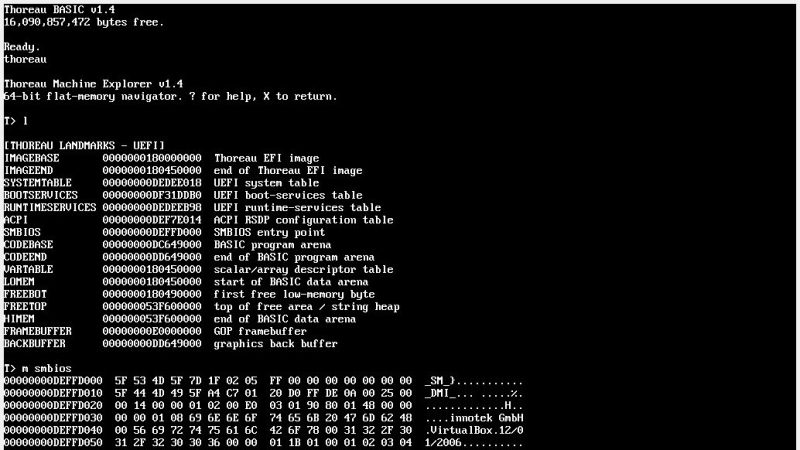
    Back in the old days the IBM-PC, like most of its contemporary computers, shipped with BASIC in ROM. Even after it stopped living in ROM, IBM-Compatibles shipped with GW-BASIC, and now we have a project that asks: what if they still did? Thoreau BASIC is GW-BASIC, but updated for the 21st century.
    It’s meant to be code-compatible with all old GW-BASIC code — which means, yes, line numbers and GOTOs abound — but it can boot from a modern x86 PC’s UEFI or run under Windows and take full advantage of modern hardware with 64-bit memory and multithreading support. Graphics are 24-bit at any resolution your monitor can handle, and there are a number of handy built-in commands to handle file management, graphics — including sprites — mouse and keyboard input, 32-channel sound, and more. It is also not strictly an interpreted language. Programs can be compiled to run under Windows or bare-metal on UEFI x86 machines.
    It’s not open source, but the project is “pay what you want” over on Itch.io, where you can also see a number of examples.
    We’ve seen other attempts to revive BASIC over the years, like MoonBASIC or BASIC-256, but we have to admit it’s never going to be the dominant force it on...
    It’s GW-BASIC, Jim, But Not as We Know It Back in the old days the IBM-PC, like most of its contemporary computers, shipped with BASIC in ROM. Even after it stopped living in ROM, IBM-Compatibles shipped with GW-BASIC, and now we have a project that asks: what if they still did? Thoreau BASIC is GW-BASIC, but updated for the 21st century. It’s meant to be code-compatible with all old GW-BASIC code — which means, yes, line numbers and GOTOs abound — but it can boot from a modern x86 PC’s UEFI or run under Windows and take full advantage of modern hardware with 64-bit memory and multithreading support. Graphics are 24-bit at any resolution your monitor can handle, and there are a number of handy built-in commands to handle file management, graphics — including sprites — mouse and keyboard input, 32-channel sound, and more. It is also not strictly an interpreted language. Programs can be compiled to run under Windows or bare-metal on UEFI x86 machines. It’s not open source, but the project is “pay what you want” over on Itch.io, where you can also see a number of examples. We’ve seen other attempts to revive BASIC over the years, like MoonBASIC or BASIC-256, but we have to admit it’s never going to be the dominant force it on...
  • Conveyor Belt GBoard Brings the Keys to You

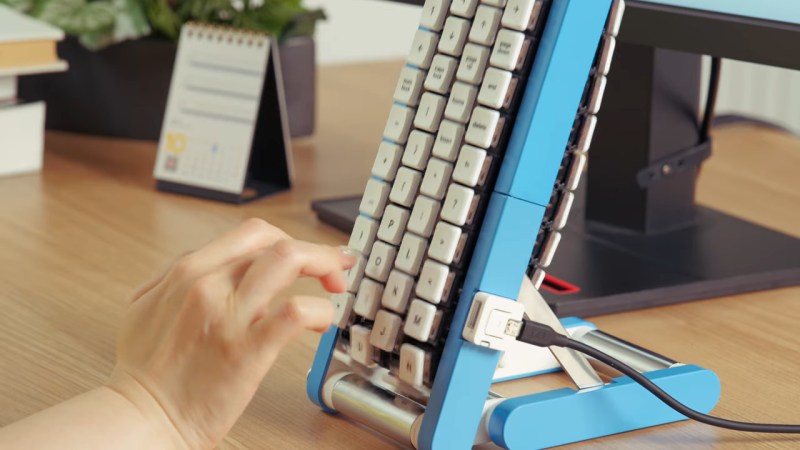
    It must be April in October again, because Google Japan has a new, hilariously impractical reimagining of the keyboard: a conveyor belt. This time it’s on GitHub with firmware, STLs, and a full build guide if you, too, want to wait a full cycle to get the ‘backspace’ key whenever you make a typo, or to write such fun words as “ooid” or “princesship”.
    You can watch it in action in the video embedded below, but just the photo probably gives you the idea: the four staggered rows of keys are each 3D-printed chains holding mechanical key switches, driven from a motor in the base. Each row also has a flexible PCB to keep everything wired together, though it’s unclear how those electrical impulses from the key presses get off the conveyor belt and into your computer. That part of the build guide is “TBD” and the source code doesn’t appear to be complete.
    Those details may be forthcoming, or it might never be revealed because this is obviously a joke, but now that they’ve gone to the effort of providing STLs, we’re now invested in figuring out how to actually make it work. A BLE-equipped microcontroller in each belt? RFID tags on each key, with readers in the base? SMD LEDs on the flex PCB...
    Conveyor Belt GBoard Brings the Keys to You It must be April in October again, because Google Japan has a new, hilariously impractical reimagining of the keyboard: a conveyor belt. This time it’s on GitHub with firmware, STLs, and a full build guide if you, too, want to wait a full cycle to get the ‘backspace’ key whenever you make a typo, or to write such fun words as “ooid” or “princesship”. You can watch it in action in the video embedded below, but just the photo probably gives you the idea: the four staggered rows of keys are each 3D-printed chains holding mechanical key switches, driven from a motor in the base. Each row also has a flexible PCB to keep everything wired together, though it’s unclear how those electrical impulses from the key presses get off the conveyor belt and into your computer. That part of the build guide is “TBD” and the source code doesn’t appear to be complete. Those details may be forthcoming, or it might never be revealed because this is obviously a joke, but now that they’ve gone to the effort of providing STLs, we’re now invested in figuring out how to actually make it work. A BLE-equipped microcontroller in each belt? RFID tags on each key, with readers in the base? SMD LEDs on the flex PCB...
  • Failing to Make a Fanless PC

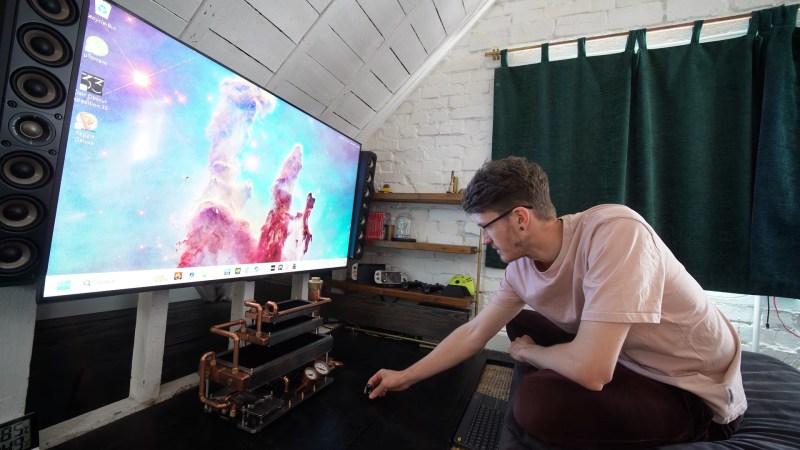
    The discerning modern gamer’s quest is to find a quieter computer without sacrificing performance. That proves challenging when modern components are highly efficient at producing monumental quantities of thermal energy. So the typical solution ends up moving enough air through the computer to create a rather tumultuous racket. So why have fans at all? Well, as [Billet Labs] demonstrates, that’s not necessarily a good idea. 
    The build begins with a block of aluminum which, with a bit of hand-metal work, may become the base of the PC “case.” A dry-fit of the aesthetically modified parts taken from a previous attempt at a fanless PC reveals the steampunk aesthetic that defines the build. On final assembly, a large amount of thermal paste under the flex ATX power supply and 6mm of thermal pads under the motherboard provide passive cooling to the block of aluminum they are attached to
    The cooling loop begins with three radiators: a big one, a small one, and a slightly smaller one. But raw metal PC radiators are difficult and expensive to come by these days. Some paint stripping and polishing will fix that problem. A few hand-made mounting brackets complete the aesthetic. All three radi...
    Failing to Make a Fanless PC The discerning modern gamer’s quest is to find a quieter computer without sacrificing performance. That proves challenging when modern components are highly efficient at producing monumental quantities of thermal energy. So the typical solution ends up moving enough air through the computer to create a rather tumultuous racket. So why have fans at all? Well, as [Billet Labs] demonstrates, that’s not necessarily a good idea.  The build begins with a block of aluminum which, with a bit of hand-metal work, may become the base of the PC “case.” A dry-fit of the aesthetically modified parts taken from a previous attempt at a fanless PC reveals the steampunk aesthetic that defines the build. On final assembly, a large amount of thermal paste under the flex ATX power supply and 6mm of thermal pads under the motherboard provide passive cooling to the block of aluminum they are attached to The cooling loop begins with three radiators: a big one, a small one, and a slightly smaller one. But raw metal PC radiators are difficult and expensive to come by these days. Some paint stripping and polishing will fix that problem. A few hand-made mounting brackets complete the aesthetic. All three radi...
  • Cube Creative Computer Company est placée en liquidation judiciaire, Xilam réagit

    Nous apprenons le placement en liquidation judiciaire depuis le 4 septembre de Cube Creative Computer Company, le studio de fabrication de Cube Creative. La société est en cessation de paiement depuis le 30 juillet 2026. Cette nouvelle intervient 6 ans et demi environ après l’annonce par Xilam du rachat de Cube Creative. Spécialiste de l’animation […]
    Cube Creative Computer Company est placée en liquidation judiciaire, Xilam réagit Nous apprenons le placement en liquidation judiciaire depuis le 4 septembre de Cube Creative Computer Company, le studio de fabrication de Cube Creative. La société est en cessation de paiement depuis le 30 juillet 2026. Cette nouvelle intervient 6 ans et demi environ après l’annonce par Xilam du rachat de Cube Creative. Spécialiste de l’animation […]
  • Watch Ian Hubert Transport Real People Into CG Worlds [Demo]

    DIY Virtual Production Using Blender
    In this episode of GameDay, we are joined by the talented (and hilarious) filmmaker, educator, and VFX artist Ian Hubert, whose indie filmmaking prowess has made him legendary in the Blender and visual effects communities. In this 50-minute demo, Ian shows us how you can combine live action and computer-generated elements by simply using Blender, a projector, and our Sci-Fi Industrial kit.

    If you’ve seen his latest installment of DYNAMO, or watched any of his popular “Lazy Tutorials,” you’d know Ian is a master of creating quick, deceptively-real visual effects – which is partly why he’s obtained such widespread notoriety. Ian is inspiring to many filmmakers because he proves that you don’t have to make super-detailed, high-definition analogs to real life in order to achieve realism. Our eyes are often a lot more forgiving than we might think. 
    In this episode Ian proves that once again by showing how indie filmmakers can mimic the virtual production techniques of shows like “The Mandalorian” – but instead of large sound stages with giant illuminated panels, he uses a projector and a blank wall to place his subject into a computer-generated wor...
    Watch Ian Hubert Transport Real People Into CG Worlds [Demo] DIY Virtual Production Using Blender In this episode of GameDay, we are joined by the talented (and hilarious) filmmaker, educator, and VFX artist Ian Hubert, whose indie filmmaking prowess has made him legendary in the Blender and visual effects communities. In this 50-minute demo, Ian shows us how you can combine live action and computer-generated elements by simply using Blender, a projector, and our Sci-Fi Industrial kit. If you’ve seen his latest installment of DYNAMO, or watched any of his popular “Lazy Tutorials,” you’d know Ian is a master of creating quick, deceptively-real visual effects – which is partly why he’s obtained such widespread notoriety. Ian is inspiring to many filmmakers because he proves that you don’t have to make super-detailed, high-definition analogs to real life in order to achieve realism. Our eyes are often a lot more forgiving than we might think.  In this episode Ian proves that once again by showing how indie filmmakers can mimic the virtual production techniques of shows like “The Mandalorian” – but instead of large sound stages with giant illuminated panels, he uses a projector and a blank wall to place his subject into a computer-generated wor...
  • GPT-6 just made THIS in Blender in 30 MINUTES! 🤯

    GPT-6 Astra is out, and it is the first frontier model to put 3D front and centre. We got access two hours before the show, so we photographed a building across the street on an iPhone, gave Astra one short prompt, and watched it take over the computer and rebuild the whole block in Blender, ornaments, street signs and all, with zero iterations. Then it edited the screen recording too. The second half is the conversation we had to have: if Astra can do anything you can do on a computer faster, what happens to specialists, and do we actually have more time now or less?

    Try invideo Agent 2:
    https://invideo.io/

    🔥 Ready to level up with AI? Sign up for the Ultimate AI Program
    https://ai.baddecisions.studio/offers/youtube?utm_source=youtube&utm_campaign=show

    ⭐ Master Unreal Engine 5 in 14 Days:
    https://learn.baddecisions.studio

    Sources:
    1. GPT-6 Astra release

    - https://x.com/OpenAI/status/2095595741528125780

    2. Astra 3D examples (Manhattan in Unreal, Blender scenes)

    - https://x.com/mattshumer_/status/2095609734845927525
    - https://x.com/mattshumer_/status/2095596175705399482
    - https://x.com/sharifshameem/status/2095653641164329143

    Powered by Dell Pro Precision

    If this podcast is...
    GPT-6 just made THIS in Blender in 30 MINUTES! 🤯 GPT-6 Astra is out, and it is the first frontier model to put 3D front and centre. We got access two hours before the show, so we photographed a building across the street on an iPhone, gave Astra one short prompt, and watched it take over the computer and rebuild the whole block in Blender, ornaments, street signs and all, with zero iterations. Then it edited the screen recording too. The second half is the conversation we had to have: if Astra can do anything you can do on a computer faster, what happens to specialists, and do we actually have more time now or less? Try invideo Agent 2: https://invideo.io/ 🔥 Ready to level up with AI? Sign up for the Ultimate AI Program https://ai.baddecisions.studio/offers/youtube?utm_source=youtube&utm_campaign=show ⭐ Master Unreal Engine 5 in 14 Days: https://learn.baddecisions.studio Sources: 1. GPT-6 Astra release - https://x.com/OpenAI/status/2095595741528125780 2. Astra 3D examples (Manhattan in Unreal, Blender scenes) - https://x.com/mattshumer_/status/2095609734845927525 - https://x.com/mattshumer_/status/2095596175705399482 - https://x.com/sharifshameem/status/2095653641164329143 Powered by Dell Pro Precision If this podcast is...
  • Optimized PCG GRASS in Unreal Engine 5 (Better Than Landscape Grass?)

    🎁 Free UE5 Landscape Material 👉 https://www.azielarts.com/aa-material

    🌿 GPU Foliage Scattering Tool → https://www.azielarts.com/azielquickscatter
    📦 Individual Courses → https://www.azielarts.com/aziel-arts-courses
    📚 Build your game with a community of UE5 artists → https://www.azielarts.com/academy

    ⚡HLSL CODE TO PASTE: https://www.azielarts.com/rtgrass-codesnippet

    CONNECT WITH THADDAEUS
    ◇ WEBSITE - https://tandreades.com/
    ◇ CHANNEL INSTAGRAM - https://www.instagram.com/thaddaeus_makes/
    ◇ ARTIST INSTAGRAM - https://www.instagram.com/azielartsacademy/
    ◇ ARTSTATION - https://www.artstation.com/thaddaeus

    COMPUTER
    ◇ GPU – https://amzn.to/45OuUBc
    ◇ CPU – https://amzn.to/3om6WMG
    Optimized PCG GRASS in Unreal Engine 5 (Better Than Landscape Grass?) 🎁 Free UE5 Landscape Material 👉 https://www.azielarts.com/aa-material 🌿 GPU Foliage Scattering Tool → https://www.azielarts.com/azielquickscatter 📦 Individual Courses → https://www.azielarts.com/aziel-arts-courses 📚 Build your game with a community of UE5 artists → https://www.azielarts.com/academy ⚡HLSL CODE TO PASTE: https://www.azielarts.com/rtgrass-codesnippet CONNECT WITH THADDAEUS ◇ WEBSITE - https://tandreades.com/ ◇ CHANNEL INSTAGRAM - https://www.instagram.com/thaddaeus_makes/ ◇ ARTIST INSTAGRAM - https://www.instagram.com/azielartsacademy/ ◇ ARTSTATION - https://www.artstation.com/thaddaeus COMPUTER ◇ GPU – https://amzn.to/45OuUBc ◇ CPU – https://amzn.to/3om6WMG
More Results
You are browsing offline. Cached feeds available.